Using the Right Equipment
Video
Having the right equipment is essential when creating professional content. Although your phone may be sufficient for creating content for Facebook or TikTok, it will not be sufficient for creating professional grade movies. We have a saying in the design world, garbage in, garbage out! Although some cameras produce good video, equipment made specifically for video is always preferred. Let’s talk about the equipment we will be using for this course.
Cameras
We will be using Nikon D7000 DSLR cameras for filming.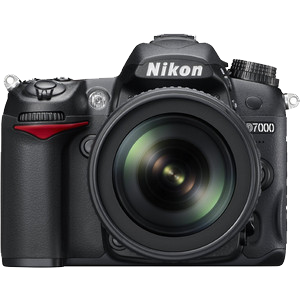 These cameras will shoot raw photos, as well as video. The camera shoots high video resolutions as well as MPEG-4 and H.264 formats. It is an average weight, so arms will not get as tired when shooting long sessions. It is weather resistant which makes it important when filming in outside conditions.
Disk Cards
You will need a scan disk card with at least 64 Gigabytes since video takes up a lot of memory. If you plan on shooting a lot of video in one session, I would suggest having extra cards on hand. Your camera has two slots to hold cards.
Tripods
A good lightweight tripod will help you have less camera shake. My media professor used to say, A camera shot is only as good as the tripod it is standing on. Most tripods fold up easily and some have carrying cases you can purchase. Make it a habit to keep one with you at all times.
Lens
It is preferred to have at least a standard lens, wide angle lens and a telescopic lens. If your budget can only afford one, then a general purpose Nikon AF-S DX Nikkor 18-105mm f3.5-5.6 VR would work well. This lens generally comes with the camera body when you purchase the kit. It will shoot some wide angle as well as short telephoto. Some lens can be more expensive than the camera body and are really only needed if you are shooting video or stills professionally. Since most of what you will be shooting for this class will be set up shots, the standard lens will work.
Accessories
To keep your camera safe, I recommended purchasing a good case for it. It should be lightweight but big enough to carry your lens and charger. A standard charger and battery is usually included with your kit. I recommend purchasing an extra battery for those long shoots.
Audio
Your camera's built-in microphone can capture audio, but it requires a quiet environment to avoid picking up background noise. For maximum clarity in your video scenes, high-quality external microphones are essential—especially for professional videos and podcasts.
Microphones
A Shure SM58 Cardiod Dynamic Vocal Microphone will be all the amplification that you will need for a podcast. According to the product description, this microphone will deliver three must haves for recording audio: Quality, consistency and durability. These microphones can be handheld or put on a stand. I would suggest buying at least two of them. One for the interviewer and one for a guest. They are around $100 a piece. I would also purchase two Posi-Lok desktop microphone stands.Recording Equipment
You will need an audio interface to capture your audio. The Volt 2 USB Recording Studio is a cost-effective solution which allows you to create professional sound. It has stereo outputs, microphone preamplifiers and headphone jacks.
Headphones
You would also benefit from having an ART Headlamp 4 4-channel Headphone Amplifier which gives individual volume control for up to four people. Audio-Technical ATH M20x Closed-back Monitoring Headphones will also isolate the sound so you can make audio decisions based on high quality sound.
Accessories
In addition to these you will need several Interconnect cables. These will plug into the mics and interface.
Green Screen
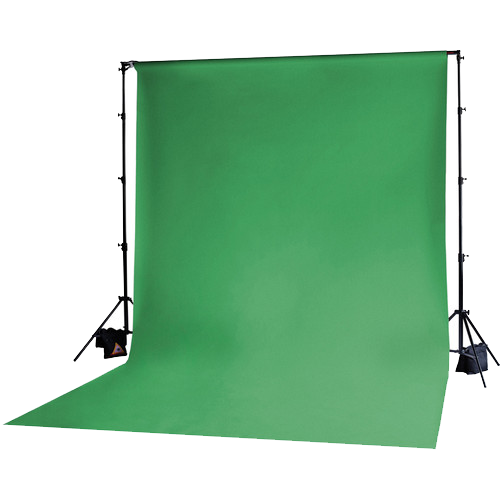
With today’s advanced technology using post-production software, a green screen maybe not be required, but if your budget can afford it than it could be a useful tool. Green screens were once extremely important and a must have. It allowed editors to easily change backgrounds in post production. For example, when filming people riding in a car, they are used behind the car as a backdrop. It was shot this way because it was easy to remove the bright green color in the editing process and replace it with rolling hills or city streets videos which made it seem as if the car was really moving through the streets of Los Angeles or whereever!